Showing posts with label Master New Media. Show all posts

Sunday, June 21, 2009

How to Upload Your Video to Multiple Sharing Sites

Hosting your videos on a free, video sharing website such as YouTube, Blip.tv, Vimeo, Dailymotion or even on a social networking site such as Facebook has many advantages for reach, higher visibility on search engine results (SEO) and of course, the fact that's it's free all the content delivery costs are paid for by the sharing site. This option for video hosting is one of three that Jan Ozer recently wrote about in his indepth article, Choosing an Online Video Platform. He referred to free video sharing sites as UGC sites and pointed out several pros and cons saying, "These UGC sites relieve you of the encoding and player-creation chores and assume the task of hosting and distributing the video for you. You can still embed the video on your own website, but by offering your video on a UGC site, you also expand the number of potential viewers, which can help from a marketing perspective. However, there are some negatives to consider, as well as some benefits..." (more)

For those interested in the "hyper-syndication" model of distributing your video to multiple video sharing sites there are a number of free and premium choices which are covered in two recent articles.

My friends at ReelSEO published this review, Upload Videos To Multiple Video-Sharing Sites - Tools & Software and highlighted the following services with short descriptions and pricing:
If you want to dig deeper you can also check out Best Tools To Upload Your Video To Multiple Video-Sharing Sites - Mini-Guide on MasterNewMedia with mini-reviews and a comparative table of 11 tools to automatically upload your clips to multiple video sharing sites.

Written by Robin Good, the guide used the following criteria to compare the services:

  • Distribution: Video-sharing sites where you can automatically upload your content
  • Analytics: Viewership information gathered from supported video-sharing sites
  • Upload: Publish to video-sharing sites accepting videos bigger than 300MB
  • Premium: Price and extra features of premium accounts for supported video-sharing sites
  • Migration: Export of your content from one video-sharing site to another site without download
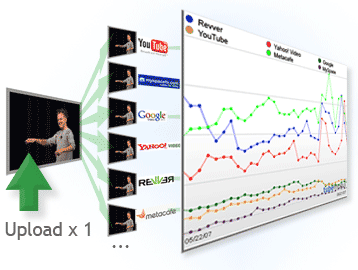
Robin included this interactive map with links to all the services in the Mini-Guide. Full descriptions and comparative details on capabilities and cost are here.


The only service I use
to distribute my videos to multiple sharing sites is TubeMogul. You can read more about their new TubeMogul 2.0 capabilities which "democratizes video metrics" here. I haven't tried any of the other services but would be interested to hear from anyone who has.

A few other options that came up in the comments on these two articles worth checking out are:

Related:

Wednesday, April 8, 2009

Robin Good's Best Video Conferencing Tools Mini-Guide

Robin Good has published a new mini-guide of the best videoconferencing tools, Best Video Conferencing Tools: Free, Low-Cost, One-To-One And Multi-Party Solutions - Mini-Guide - Robin Good's Latest News.

The videoconferencing apps mainly come in two flavors, browser-based and client-based. Most all run on Flash and require at least Flash Player 7 and others like Skype, iChat and ooVoo are stand-alone applications.

Most of them have similar functions with supporting a two-way video call, text chat, contact lists, scaling of windows and modest echo cancellation. Robin noted that many videoconferencing tools, "often integrate some complementary features, such as the ability to make VoIP phone calls, do screen-sharing, record sessions, transfer files, or whiteboarding." While many of those features are he added that premium services offer "pro features like better video quality, more participants, or advanced control and customization."

See his blog post for full descriptions and comparison tables of each product.

He used the following criteria to evaluate these tools:
1) Platform: Type of tool (software / web-based).

2) Video channels: Number of parties that can participate to a video conference at the same time (refers only to multi-party tools).

3) Public conference: Ability to make a video conference fully public.

4) Embeddable widget: Flash widget embeddable on web sites or social media sites.

5) Session recording: Feature to record your conference session for later review or publishing.

6) Text chat: Ability to text-chat other participants.

7) Other features: File transfer, screen-sharing, live annotation, whiteboarding, etc.

8) Pro starting price: Price and additional features of the first advanced pricing level.

Best Free and Low-Cost One-To-One Video Conferencing Tools

  1. Skype
  2. Windows Live Messenger
  3. Yahoo! Messenger
  4. Google Video Chat
  5. AIM Chat
  6. SnapYap
  7. Boostcam

Best Free and Low-Cost Multi-Party Video Conferencing Tools

  1. ooVoo
  2. SightSpeed
  3. Adobe Acrobat Connect Pro
  4. Nefsis
  5. VSee
  6. iChat
  7. MegaMeeting
  8. MeBeam
  9. TokBox
  10. Vidivic
  11. FlashMeeting
  12. iNeen
  13. PalBee
  14. iSpQ
  15. Ekko
  16. Vawkr
  17. iVisit
  18. Meeting24.tv
Honorable mention
http://www.dimdim.com/

This list was originally prepared by Robin Good and Daniele Bazzano for MasterNewMedia, and first published on April 6th, 2009 as "Best Video Conferencing Tools: Free, Low-Cost, One-To-One And Multi-Party Solutions - Mini-Guide".

Tuesday, September 9, 2008

From Robin Good's Sharewood Guide - Best Video Conferencing Tools That Anyone Can Use

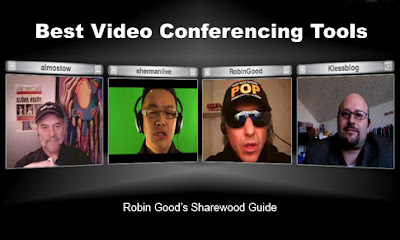
Robin Good has published another round up of videoconferencing tools available for PC and Mac users titled, Best Video Conferencing Tools That Anyone Can Use - Sharewood Guide - Robin Good's Latest News, and if you look closely at the image from the guide which I've included here you'll see I've been syndicated as part of banner graphic.

I've used many of these videoconferencing and webconferencing tools and I'm hearing about a few of them for the first time. As Robin says, "Video conferencing tools often integrate some complementary features beyond video, audio/VoIP and text chat, such as a file transfer facility or an audio/ video recording feature." He added that the quality of the tools vary and that it's mainly influence by the quality of your web cam and your internet connection.

If you're familiar video compression you know that motion degrades video quality and that a still image will look much clearer in comparison. The size of your bandwidth pipe affects how much data you can send and receive and some of the videoconferencing tools are optimized to work well at low data rates while others have expanded features available at higher data rates. One evolving feature available at higher data rates is HD video quality at 720p with H.264 encoding which you'll be hearing more about as broadband connections become the norm. While most of these videoconferencing solutions operate well on low bandwidth you may sometimes a fair amount of motion artifacts, tiling and freezing in the video. - Update 9/10/08

However, that's not covered in the Sharewood Guide and it focuses on the following key videoconferencing features:
  • Streaming feeds number (or number of participants)
  • Text-chat
  • File transfer
  • Session Recording
  • Web-based
Here's the list and you can read more about each tool in the Sharewood Guide:
  1. Oovoo
    Software client. Free up to 3 and subscription-based up to 6 with recording.
    http://www.oovoo.com/

  2. Adobe Connect Now
    Free after registration.
    http://www.acrobat.com/

  3. VSee
    Free for unlimited number of participants.
    http://vsee.com/

  4. SightSpeed
    Free for two people, or $9.95/month for 4 people and unlimited video storage.
    http://www.sightspeed.com/

  5. PalBee.com
    Free.
    http://www.palbee.com/

  6. MeBeam
    Free web-based with up to 16 participants, has had problems with nudity.
    http://www.mebeam.com/

  7. Vidivic
    Free with up to 9 particpants.
    http://www.vidivic.com/

  8. FlashMeeting
    Need a registered user invite.
    http://flashmeeting.open.ac.uk/

  9. MegaMeeting
    Up to 16 participants.
    http://www.megameeting.com/

  10. WengoMeeting
    Register and add up to 5 users. Free.
    http://www.wengomeeting.com/index.php

  11. EkkoTV
    Free and web-based, no downloads.
    http://www.ekko.tv/

  12. Vawkr
    Free and web-based, no downloads.
    http://vawkr.com/


Video Calling

  1. Skype
    Free, the ubiquitous peer-to-peer software client.
    http://www.skype.com

  2. Tokbox
    Free, web-based, can record video messages.
    http://www.tokbox.com/

  3. SnapYap
    Free, peer-to-peer calls, need a registered user.
    http://www.snapyap.com/

Best Video Conferencing And Video Calling Services - Comparison Table


go to the table!

* Values intended for paid versions only.


This content was originally published as Best Video Conferencing Tools That Anyone Can Use - Sharewood Guide - Robin Good's Latest News by Robin Good on September 8, 2008 for Master New Media.

Creative Commons License
This work is licensed under a Creative Commons License.

Sunday, April 20, 2008

Robin Good on How To Make Better News

Robin Good published a new online content strategy on how to make better and more useful news so that you don't just echo the same story. He says, "already 25 guys (are) doing that same job please wake up and realize that that's not very useful."

I share his advise here because, as someone like myself who does a share of news reporting within the online video niche, it's a style of content publishing that I try to subscribe to with this blog. He offers this suggestion, "So one way you can stay on top of your wave, is start ahead of the game to focus only on the news that are very relevant to your niche rather than just bringing up news about technology or about marketing which we have zillions of websites out there doing this."

You can view his video below or go to the go here to view the transcript.


A special thanks Robin for sharing this online content publishing strategy. Check out Robin Good's Master New Media: Professional Online Publishing: New Media Trends, Com

Grazie Robin, per dare questa strategia della pubblicazione in linea! Ciao!

- Video posted by Robin Good on Friday, April 18 2008, as Online Content Strategy: How To Do Better News When Everyone Else Does News Too - Video for Master New Media

Wednesday, February 27, 2008

FreeScreencast.com - A Free Screencasting Publishing Tool

I learned about another screencasting program thanks to Robin Good who pointed out this new free online tool called Freescreencast. It's a combination of a Windows only free software download (currently in Beta10) and a web site that hosts your content.

In his article, "Screencasting Recorder: Upload, Share, Publish, Embed - FreeScreencast.com Is Here" Robin Good describes FreeScreencast as, "a new free web-based service that allows you to record anything taking place on your screen in a simple way. Not only. FreeScreencast takes care of uploading your recorded clip and provides you immediately with an embed code to post the screencast on your site. This is the first easy, and inexpensive screencasting tool that truly empowers online publishers to create and publish high-quality screencasts on their blog sites with the minimum effort."

I haven't tried it yet, but it from what I can tell it's pretty easy to use and according to the FreeScreencast web site you can get started in 3 easy steps.
This is a demo screencast "Creating screencasts with FreeScreencast.com" embedded below:


The FreeScreencast blog had these useful links on their Blogroll:
If you haven't gotten enough of screencasting MakeUseOf.com has a review by Travis Quinnelly of 5 Free Screencasting Apps for Creating Video Tutorials. It includes five of the same apps from Sean P. Aune's Mashable list from the other day (AviScreen, CamStudio, Copernicus, Screencast-o-Matic and Jing.)

Special thanks and acknowledgements to
Robin Good for his article "Screencasting Recorder: Upload, Share, Publish, Embed - FreeScreencast.com Is Here" first published on February 26th 2008 for Master New Media.

Friday, February 22, 2008

Robin Good's ooVoo Review

Robin Good has published the quintessential review of ooVoo, titled "Video Conferencing As It Should Be: Multi-Party, Affordable, Cross-Platform - The Video Conversation Starter Is Here - OoVoo." In his article he provides a extensive and detailed explanation of the key features which he describes as, "real-time communication with audio, video and the ability to share files and documents easily. In this respect OoVoo is very much on focus and not trying to do too many things that would place it in direct competition with other conferencing and collaboration tools."

This is my fourth ooVoo post within the last two weeks so you can probably guess that I'm an ooVoo fan. I have yet to try it on a PC and have only experienced the Mac version (which is actually still available from the "Download ooVoo Now" link on the My ooVoo Day With... web page) or (the direct link at http://38.101.227.70/oovoo/ooVooInstaller.zip and enter user name: oovoo and password: oovoomac at the appropriate prompts.) The PC version has more features than the Mac version including free telephone calls to US and Canada landlines or mobile. Robin points out that, "you can also add phone participants in the US to your ooVoo video calls. In this introductory period OoVoo provides up to 120 minutes of FREE phone calls through March 1, 2008."

Another PC only feature is the ability to record the videoconference session. This is really cool and lends itself to many possibilities for archived interviews, panel discussions and talk shows. Robin shared this example of a recorded session that was saved as a .flv and uploaded to Blip.tv.


If you haven't tried ooVoo yet but you're interested in how it works I suggest you read the full text of Robin's ooVoo review. He offers some suggestions on what ooVoo could do to improve adding that, "I strongly feel that ooVoo has a tremendous window of opportunity if it can further streamline and clean up its act, before Skype comes out with its own multi-party video conferencing solution or Google launches its own one. The time is ripe but one needs to act rapidly and effectively."

Overall his impression is positive and share these concluding remarks, "OoVoo is a video conversation starter and one great tool to hold impromptu professional video conferencing meetings online."


"Video Conferencing As It Should Be: Multi-Party, Affordable, Cross-Platform - The Video Conversation Starter Is Here - OoVoo" was originally written by Robin Good for Master New Media and first published on February 19th 2008.

Friday, February 15, 2008

My ooVoo Day With... Robin Good

[oovoo_robingood2.jpg]

I was back for another session of My ooVooday With... and I had great video conversation with Robin Good and social media and blogging guru Sherman Hu and Allen Mostow who manages LA music artist Audra Hardt. I had been looking forward to this opportunity to meet the Master New Media guru and I also met a few new friends. We had a lively discussion about online video publishing tools and strategies. Some of the video tools mentioned included Qik, Mogulus, Kyte with ooVoo now joining the mix since you can both conduct and record a live multi-party videoconference. Robin added that Mogulus and Qik has integrated so producers can now stream live from their mobile phones directly to their Mogulus channel with Qik.

In additional to our live ooVoo session, Robin was simulcasting a live feed of our videoconference to his Qik page and you can view the archive recording below.


For some, videoconferencing technology can be cumbersome and awkward to use, but it was real easy to have an open group conversation using ooVoo. The user interface is both slick and intuitive in design and both the video and audio quality is actually quite good. The video runs at about 10 frames per second (fps) so motion is pretty smooth and I saw very little tiling or motion artifacts. The audio is quality is crisp and it works best if you have headphones as that helps to eliminate the echo. Good lighting is essential too so that your participants can see your facial expressions. The ooVoo web site has some good information on video quality.

I've been in the videoconferencing industry for 18 years and I find it remarkable that you can have a cross platform multi-party IP videoconference with up to 6 people... totally free!

My ooVooday With... seems to be a big hit for many bloggers as I've seen a number of ooVoo comments and reviews over the last week. Chris Brogan posted an interesting review on his blog and I second his kudos to Scott Monty of Crayon for organizing this incredible social experiment. You can also see Sherman Hu's post which includes a video recording of his ooVoo videoconference with Joseph Jaffe (JaffeJuice.com)

My next scheduled My ooVooday With... is this Sunday with iJustine.

Tuesday, January 29, 2008

A Beginner's Guide to Internet Video Publishing


If you're looking for a comprehensive guide to online video publishing, then look no further, because Michael Pick wrote this new guide for Master New Media titled:

Internet Video Publishing: A Beginner's Guide

He did an incredible job of collecting countless resources to help you get started creating, authoring, publishing and monetizing your video content online.


He writes, "In this beginner's guide to Internet video publishing I take you through everything you need to know to get up and running. I take a look at:
  • Creating your video - whether you want to make a video blog, live webcast, split screen interview, mashup or screencast
  • Editing, adding effects and exporting your video using both desktop and online applications
  • Where to publish your video and the differences between the services available
  • Monetizing your video - how to turn your efforts to profit
  • Licensing your video - the benefits of making it easy for people to share your content
  • Promoting your video - what to do when once your video is online if you want people to watch it
  • Additional resources you can use to find out more about publishing video to the web"
I found this guide to be extremely helpful with its numerous collection up-to-date tools and techniques. I highly recommend it to anyone involved in producing or publishing internet video.

Related article: