Showing posts with label Video Applications. Show all posts

Wednesday, December 21, 2011

Webcasting Tips and Tricks From the Enterprise

Last month I had the pleasure of participating on a panel session: Webcasting Tips and Tricks From the Enterprise, at Streaming Media West. The panel was comprised of several enterprise video industry veterans from Wells Fargo, Cadence, Oracle, Lockhead Martin and myself, from Kaiser Permanente. While I'd usually say that I'm pleased to share the video from the session, I have to say that I may enter it in The Sucky Video Awards. I say this because from my personal experience, the videographer forgot one of the cardinal rules in video – have good lighting. In this video, it looks like only one light was used to cover the four presenters and moderator and you can barely see me in the dark corner of the stage. I would have used at least two lights in this situation, and also move the podium to one side so that all the presenters were in a row and well lit. Beyond that – I present this video not only for the great content each presenter shared, which is very valuable webcasting tips and tricks from the enterprise, but also as an all important tip – invest in good lighting or your video will suck.


Streaming Media West 2011, Session C201: Webcasting Tips and Tricks From the Enterprise

This session focuses on best practices from enterprise corporations which have adopted and implemented live video across their organization. See firsthand how these companies are using video for internal and external communications and learn how you can better leverage assets already available inside your company. Hear firsthand from those who have been successful with their deployments and learn what advice they have for others deploying live video in the enterprise today.

Moderator: Patty Perkins, Team Leader, Wells Fargo Creative Services Technology, Wells Fargo
Speaker: Michael Chop, Senior IT Architect, Cadence
Speaker: Tony Sehgal, Sr. Manager, Digital Media Operations and Infrastructure, Oracle
Speaker: Eric Hards, Manager, Web, Media Graphics and Streaming, Lockheed Martin
Speaker: Larry Kless, Production Manager, Videoconferencing and Virtual Events, Kaiser Permanente

We started our discussion talking about the partnerships that we've developed within our organizations and how we use all the assets available us to make webcasting work.

Eric Hands shared how at Lockhead Martin, they just completed a architecture design working with each of our individual business units. Each unit currently has its own streaming system. Some from one vendor some from another. It has always been his goal to provide a unified architecture and they are getting close with these new accepted requirements. But it has a long way to go.

Mike Chop's elevator pitch is "To have a strategy around any audio/video that touches our
network". At Cadence, they are pretty strong on the webcasting, telepresence, unified communications, Microsoft Lync and trying to add mobile to the mix. They started building a pretty strong creative production group. Here is a link to their latest podcast. http://www.youtube.com/watch?v=4GOPPf_9Vr8

Tony Sehgal discussed how at Oracle, they deliver live streams to both external and internal audiences using two different networks and media platforms. His responsibilities focus on live events, but he works with their broader team on hosting on demand media for Oracle's external audience. They do all their streaming in Flash, both internally and externally, and were one of the first organizations to stream with Flash multicast over their LAN. He's able to get metrics data for live events from Akamai and from MediaPlatform's Webcaster product. They also have a metrics team that implements SiteCatalyst to capture the official metrics data for our team. The SiteCatalyst plugin has been implemented on all of our live event platforms.

My work at Kaiser Permanente is focused on virtual events delivery, through videoconferencing, WebEx and webcasts and the full content life cycle. I partner closely with a colleague in our IT organization who heads up our WebEx rollout and over the last few years we've developed a Virtual Events Delivery Team. Prior to WebEx, we used our videoconferencing network as our internal broadcast network but since we've standardized on WebEx as our web conferencing platform we've been able to get to people's desktops, where they've been asking us to reach them for years. We work with internal business units on enterprise all hands meetings, town halls, educational sessions and since we're a health care organization we've even done live broadcasts from the OR (operating room). We currently don't have an internal video streaming we outsource large webcast events. On demand video is mainly delivered from web servers a progressive downloads and or from internal social media platform that is powered by Jive Software.

An interesting topic we discussed was a question Mike Chop asked about: What are “good metrics” for “stickiness”, his term for improving attention span. At Kaiser Permanente, we use Webex as one of our enterprise webcast platform, and a great tool within Webex, is the attentiveness meter that can tell if people are multi-tasking or paying attention. We've found that we can achieve 75% attentiveness with live video and real-time chat which helps keep the virtual attendees highly engaged. On demand video is not at all as engaging as live video, and having a community manager to respond to chat questions and add color helps keep people tuned in.

See my last post for more webcasting tips and tricks: Larry Kless' Weblog: I'm going to Streaming Media West to discuss Webcasting Tips and Tricks From the Enterprise

Sunday, November 6, 2011

I'm going to Streaming Media West to discuss Webcasting Tips and Tricks From the Enterprise

I'll be taking a short break from my intense work schedule next week to speak at Streaming Media West, on a panel session, Webcasting Tips and Tricks From the Enterprise. According to the conference program, "this session focuses on best practices from enterprise corporations which have adopted and implemented live video across their organization. See firsthand how these companies are using video for internal and external communications and learn how you can better leverage assets already available inside your company. Hear firsthand from those who have been successful with their deployments and learn what advice they have for others deploying live video in the enterprise today."

Streaming Media West returns to Los Angeles and the conference organizers promise it to be even best show yet. Last year more than 2,500 content owners, viral video creators, online marketers, enterprise corporations, broadcast professionals, ad agencies, educators, and others all come to Streaming Media West to see and hear more than 100 speakers and 30 sessions focused on latest online video technology and the business models that are coming of age. In conjunction with the show is the first ever HTML5 Video Summit, which is an expanded two-day summit with how-to sessions, demos, case studies, round table discussions and more.

Here's a short promotional video about the conference which kicks off this Monday with pre-conference workshops and the show is November 8-9, 2011.


My session is scheduled on Wednesday, November 9, 2011 at 10:30 am and confirmed participants include:

Moderator: Patty Perkins, Team Leader, Wells Fargo Creative Services Technology, Wells Fargo
Speaker: Michael Chop, Senior IT Architect, Cadence
Speaker: Tony Sehgal, Sr. Manager, Digital Media Operations and Infrastructure, Oracle
Speaker: Eric Hards, Manager, Web, Media Graphics and Streaming, Lockheed Martin
Speaker: Larry Kless, Production Manager, Videoconferencing and Virtual Events, Kaiser Permanente

I'll be wearing my day job hat as a webcast producer like I did when I first spoke at Streaming Media West five years ago on a panel session on, Distribution & Delivery of Digital Media. The following year I also spoke on another panel session, Best Practices For Webcasting Production which I blogged about here.

Here are some "best practices" that I shared in that post, that address the technical and logistical challenges for webcasting, and how you put the right team and the right technology in place.

If you are producing a webcast, consider the following:
  • Know your role. You may be producer, director and technical director and even camera all rolled up into one. Or you may have the luxury of hiring a full crew.
  • Get clients on board with deadlines, financial commitments and better understanding of web cast requirements.
  • Audio is the number one killer. It’s an ongoing issue when using wireless microphones, telephone call ins, multi-point conferencing and live PA (Public Address) system.
  • Working with a team you know and trust and who knows your business is best. Relationships are vital to your process. Delegation and deference to expertise key to getting the job done. You need to rely on your team to do their job and sometimes take over your chores too when you get called away to manage client issues and handle last minute changes.
  • Redundant personnel and technology is a must and equipment failure should be expected. Back up to you back ups really saves the day in a pinch.
  • Make every room a broadcast studio.
  • Site surveys at least a good 8 weeks ahead to inspect data and A/V ports, power requirements for lighting, ceiling height for rigging, windows and doors for light and noise, bring a digital camera, measuring tape and a continuity tester as part of your arsenal.
  • Complete all pre-web cast equipment and connectivity testing well in advance and conduct it on-site for higher reliability.
  • Prepare a production summary that includes every last bit of detail that covers the entire production. Give everyone on the crew a copy for reference and lead a production meeting before the works so that all teams are synched up.
  • Be prepared for last minute changes and if there’s time just roll with them – update your script, rehearse if possible, but say “No, we’re out of time” when you have to. Really, there’s nothing worse than a major on-air blunder. But as they, “It’s live television.”
Also, be sure to have back up equipment and crew in case of technical or physical problems, and don't forget to test your webcast on location. I'll share more tips following my session next week.


For more information, go to: www.streamingmedia.com/Conferences/West2011/

Resources:
Larry Kless' Weblog: Best Practices For Webcasting Production
Larry Kless' Weblog: Streamingmedia.com: How to Execute a Successful Webcast
Larry Kless' Weblog: Streamingmedia.com Featured Article: Lessons Learned from Live Events

Monday, October 4, 2010

Time's Up for 12seconds.tv, "Twitter for Video" Startup Officially Shuts Down October 22

In an email to the community of 12seconds.tv users, called "12ers", co-founder Sol Lipman announced today that the 2-year old startup known as the "Twitter for Video," would officially end operations on October 22nd. What began as an idea over beers between two friends with "scrappy energy" ended up being a wild ride with many ups and downs, Lipman explained that 12seconds is in its twilight and had reached the end of its life cycle.

In speaking with Adam Ostrow of Mashable, Lipman pointed out a number reasons why they are pulling the plug on their once popular video service. Citing low traffic on the site which had not seen any real growth in the last two years since its launch, along the high cost of running the video site which had been self-funded are two main reasons. But essentially, 12seconds had been squeezed out of the Twitter app ecosystem as that market has narrowed with the richer experience of the New Twitter.

He told Mashable that:
“I don’t really see the growth in Twitter that we were seeing [back when we launched]. I don’t see it as an explosive growth opportunity right now for a third-party application builder. In any ecosystem eventually there are going to be winners and losers. I think that’s going to shake out more and more as time goes by."
Lipman told Janko Roettgers of NewTeeVee, that 12seconds “fell victim to Twitter’s growth." It was originally built to be its own video community but got swept up in the excitement of Twitter only to later see its users abandon the site for other services. While 12seconds said had moved on from being a Twitter utility, Roettgers pointed out that there was more to it than that, and actually most of the 12seconds team has been working on the location-based social networking startup Rally Up, that had just been acquired by AOL in August.

12seconds seems to have followed a similar path as Seesmic, which also started up as a video community but re-engineered itself as a Twitter client developer. Rather than shutting down the site, Seesmic deemphasized the video conversations to a new domain Seesmic.tv which is still up and running.

With 12seconds.tv users could record 12 second video messages with a web cam or mobile phone to share as status updates on Twitter, Facebook and embed them into blog or websites. While the site saw some success in gaining celebrity users, crowdsourcing commercials, launching iPhones apps, taking part in the first annual Streamy Awards and reaching 200,000 users – 12 seconds was self-funded and was unable to create a sustainable revenue model or attract VC money.

Lipman had this to say to the loyal 12ers:
"It is time to end 12seconds. However, if 12seconds had a bucket list it would have filled it up with amazing life experiences!  We launched an innovative micro-vlogging system, built crazy mobile apps, created revenue with legit sponsors, we were nominated for awards and had the best users on the Internet - our beloved 12ers. 12seconds is not a failure - it is a life well-lived.  It really is about the journey.  I know this because I'm at the destination." 
12seconds will be releasing a download tool later this week for 12ers to bulk download their videos. It will be available until they pull the plug on October 22nd.

Related:

Sunday, June 28, 2009

Facebook Goes Live, Partners with Ustream on Live Video Social Streaming

In yet another integration of online video and social media platforms, the social networking giant Facebook has just announced that they are offering live streaming on Facebook pages through a partnership with Ustream, the leading live streaming platform. The new Facebook social widget called the Live Stream Box was first demonstrated during some recent Jonas Brothers concerts but was officially released this past week in both a free ad supported version or a premium white label version version powered by Ustream's Watershed available for $15,000 primarily geared toward artists and brands that can pay the "one-time development fee" and a subscription to Watershed's monthly $879 plan. See the Ustream on Facebook FAQs for more information.

With the merging of functionality between social network platforms Facebook is starting to look a lot like Twitter or Friendfeed incorporating real-time status updates and shared links, photos and videos. While real-time chat is a common feature in live streaming applications, it's though the size of the Facebook community that makes the Facebook/Ustream partnership significant. The 2009 US Presidential Inauguration was a seminal online event and important moment for Facebook Platform marking the beginning of a new era in social streaming. Working with CNN Facebook tested a new feature that let people share Facebook status updates and comments side by side with real-time streaming video on CNN's website garnering over a million status updates in two hours.

On the Facebook Developers blog Tom Whitnah explained, "We realized how powerful it was to see what your friends were saying, not just on Facebook, but right in context on CNN.com. Users posted over a million status updates during that two hour event. Since then, we have worked with several established websites and entrepreneurs to show real-time updates next to live broadcasts, including the NBA® All-Star Game and many of the sites covering the Oscars®, and we've seen many other sites integrate similar features themselves such as Nana10 in Israel which hosted live broadcasts and their own live conversations using Facebook Connect during the Israeli elections earlier this year."

The Jonas Brothers event also had huge numbers according to Ustream:
  • 1.5 million unique posts were made via Facebook Live Feed
  • 23K average posts per minute
  • More than 100K users joined the webcast after seeing their friend’s comment on Facebook
  • 974K total unique viewers watched the one hour webcast
  • Ustream reported the Jonas Brothers webcast on Facebook surpassed the largest live video event they have hosted for any music artist
  • Over 40,000 tweets were sent out about the event during the one hour webcast
The widget lets users who visit your Facebook site or application share activity and comments in real-time. Powered by Ustream, it works best when you are running a real-time event, like live streaming video for concerts, speeches, or webcasts, live Web chats, webinars, mass-multiplayer games, TV show or any video broadcast. The Live Stream Box is scalable, and according to Whitnah, it can handle millions of simultaneous viewers updating in real-time. He also said it's easy to install and takes just a minute to set up.

You can include a Live Stream Box anywhere on the Web, or within your Facebook Page, or a Facebook application. See the full instructions on the Facebook Developers Live Stream Box wiki page that walks you through the set up and adding Live Stream Box to your site or IFrame application.

In case you hadn't noticed, we're in the era of live social streaming and while the price tag is steep for a white-label version on the Live Stream Box it's clearly targeted at artists and brands like the Jonas Brothers who as Nicholas Carlson notes, "putting three dudes on a couch in front of a laptop doesn't cost a lot. Neither Facebook nor Ustream, which provided the video tech, sold any ads against the show, but there is good reason to expect they'll slap a pre-roll on the next Jonas chat."


Related:
Updated links and text: 6/28/09

Monday, January 19, 2009

Ustream Viewing Application Now Available in the Apple App Store, Works Only on Wi-Fi

Ustream delivered on their word that they would have their new live mobile streaming application ready for viewing the inauguration. Their new iPhone Viewing Application is now available in the Apple App Store.

The one drawback is that the viewer currently only works only with Wi-Fi, which is contrary to their claim that your can watch Ustream anywhere "regardless of where you are at and what you are doing, you can choose to be in the moment with others in a shared live experience around a live event. If you are out-on-the-town and know that a guest speaker at a major conference is “going live” and want to watch live and be-in-the-crowd."

John Ham, FounderAccording to John Ham, Ustream Founder, "The Ustream iPhone Viewing Application was pending approval from Apple and was approved in time for the inauguration. Now any iPhone owner can watch the inauguration from their iPhone. Presently, the Ustream iPhone Viewing Application is WiFi only to ensure the highest quality broadcast on the iPhone, but stay tuned for developments."

They may have scaled back the application to Wi-fi only to comply with ATT's terms of service and keep the live video traffic off of the ATT 3G network. But doesn't anywhere mean anywhere? Even the graphic I used in this post from the Ustream blog says "anywhere" and not "anywhere there is Wi-fi." So technically this application allows you to view live and on-demand Ustream content similar to Joost's iPhone app.

I haven't tested the Ustream app myself, but I've read several reviews which have been favorable. Here's a few posts from people who have tested the app:

Gallery: Ustream Screen shots

The application can be downloaded at this iTunes link:
http://itunes.apple.com/WebObjects/MZStore.woa/wa/viewSoftware?id=301520250&mt=8

Sunday, October 19, 2008

Weekly Review: Meet the New Online Video Players - Brightcove 3, Flash Player 10, Joost and Silverlight 2

I had started each of these news items as separate posts last week but I combined them all into this single post as weekly review. We all know the financial situation has put start-ups on shaky ground with a number of them already closing their doors. But the online video world continues to innovate and invest in new technologies for content creation, delivery, syndication and distribution. New online video players were introduced almost every day last week by the major players in the industry. Here's a sort list run down of the significant announcements from the previous week.


On Monday, October 13th Brightcove introduced Brightcove 3, their new online video publishing platform. Andy Plesser shared this video on Beet.TV of Jeremy Allaire, Brightcove Chairman and CEO, who demonstrates the new platform. Andy wrote, "For this interview, we have published the video in the new Brightcove 3 environment. Check out full screen to see how well the player works. It uses a new kind of dynamic delivery which adjusts the bitrate to the viewers' bandwidth." - from Beet.TV: Brightcove Unveils New Video Pubishing Platform with New Service...for Large and Small Video Publishers


"Video has gone from being a consumer-driven entertainment experience on the Web to being a basic feature of any professional website across all media and corporate sectors," said Jeremy Allaire, Brightcove chairman and chief executive officer. "While online video is becoming ubiquitous, one size does not fit all. Built as an extensible SaaS application, Brightcove 3 provides tremendous flexibility to online publishers to meet the needs of the full spectrum of different end-user scenarios." - from Brightcove 3 Transforms the Business of Online Video Brightcove Press Releases

What's significant in the Brightcove 3 release is a scaled offering and tiered pricing structure for small and medium-sized companies, something they've have been criticized for which has been a barrier for by the smaller enterprise customers.

Mark Robertson has a detailed report that outlines the new areas of functionality along with with customer experiences at: Brightcove 3 Online Video Publishing Platform for Media | Reel SEO

More reading:


On Tuesday, October 14, Microsoft made Silverlight 2 available for download to the public and for those who have been using it believe it contains vast improvements. As a competitor to Adobe's Flash Player it's received good press for it's updated interactive functions and customizable interface for big events like the 2008 Beijing Olympics and the Democratic National Convention.

The October 13 press release included some interesting statistics, "Silverlight adoption continues to grow rapidly, with penetration in some countries approaching 50 percent and a growing ecosystem that includes more than 150 partners and tens of thousands of applications. During the 17 days of the 2008 Olympics Games in Beijing, NBCOlympics.com, powered by Silverlight, had more than 50 million unique visitors, resulting in 1.3 billion page views, 70 million video streams and 600 million minutes of video watched, increasing the average time on the site (from 3 minutes to 27 minutes) and Silverlight market penetration in the U.S. by more than 30 percent. Broadcasters in France (France Televisions SA), the Netherlands (NOS), Russia (Sportbox.ru) and Italy (RAI) also chose Silverlight to deliver Olympics coverage online."

It was an automatic update for clients who already had Silverlight 1 installed and one of teh key advantages is cross browser support of Microsofts .NET Framework for Rich Internet Applications (RIA) and you can read more on the highlights here along with a technology preview of the Soyatec project, an open source RIA development environment at: http://www.eclipse4sl.org.

Microsoft had recently made headlines last month with the announcements at IBC which included playback of H.264 video and its equity stake in Move Networks.

This video from Streaming Media West features Eric Schmidt, Director of Silverlight Media Evangelism, Microsoft who presents "how Silverlight enables a host of engaging in-stream and rich media advertising scenarios, allowing advertisers to create compelling, best-of-breed brand experiences on the web." You can also download the presentation Integrating Advertising With Microsoft Silverlight.


More reading:

Also on October 14, Joost relaunched with a new Flash-based web browser interface with social tools to navigate through it's enormous library of videos and share with friends. The once dominant player in the online video market has fallen out of favor with stiff competition from Hulu, YouTube, Veoh, DailyMotion and many other sites. While Joost has about 46,000 assets or about 8,000 total hours of video it's unclear whether or not it can successfully compete in the crowded field.

There's been much skepticism like that of Erick Schonfeld of TechCrunch who wrote, "The Flash site comes almost exactly a year after I wrote a post pointing out that Joost’s peer-to-peer software approach would not work and that it would have to switch over to Flash-based video, just like every other Web video service. People don’t want to have to launch a new piece of software to watch video on their computers. They want to watch it in their browsers... It took Joost a year, but it has finally realized that the Web is where it’s at." - from Joost Turns On Its All-Flash Website. Is Anybody Watching?

Also according to Pete Wylie, "Joost's player is a straight Hulu rip, no matter what anyone says. It may have one or two features that Hulu doesn't have, but it doesn't have the level of content or real community viewership to touch them there. It got off to a head start and now finds itself behind the game and running out of original ideas. Copying a winning idea after the original one failed is far from exciting or groundbreaking." - from Three new video players, but different results - FierceOnlineVideo

More reading:

On Wednesday, October 15, Adobe released Flash Player 10, it's ubiquitous online video player for download. With new features and visual performance improvements like native 3D transformation, animation, advanced audio processing, custom filters and effect, advanced text layout and GPU hardware acceleration. The most notable improvement for online video is dynamic streaming which will automatically adjust bitrates of streaming media depending on changing network conditions. It also extends capabilities of its CS4 software suite and an upcoming release of Adobe Media Server will implement dynamic streaming. Read more detailed information in the release notes here.Additionally this update addresses security vulnerabilities.

This video from Mike Downey, Principal Evangelist for Platform Business Development at Adobe Systems was published in May 2008 when the first public Adobe Flash Player 10 "Astro" beta had just been released. This video gives a quick overview of some of the big new features.


Liz Gaines of NewTeeVee says, "Despite new competition from Microsoft’s Silverlight, Adobe appears to be adding to its market share. Some 86 percent of online videos viewed in the U.S. in August used Adobe Flash, according to comScore. That’s up from 66 percent in November 2007. Adobe attributes its own growth to the expanding market and to new deals with power sites LIKE? DirectTV, MySpace Music, Disney, and Sunday Night Football. Meanwhile, when you combine its Windows Media and Silverlight products, Microsoft has apparently lost market share. It had 24 percent U.S. market share last November and now has 13 percent." - from Adobe Adds Dynamic Streaming and More to Flash Player « NewTeeVee.

More reading:

Sunday, September 14, 2008

Hey Jim Kukral, I Bought a Flip Video Camera!

So I finally took the advise of both Jim Kukral and Chris Pirillo and bought a Flip Video camera yesterday. I had been thinking about getting one for a while and decided to pick up the Flip Ultra at Costco. After so many years of wrangling with videotapes I'm really tired of dealing with them. This will make it easier for online video publishing and video blogging. Anyone else out there have a Flip? What do you think?

Here's my Seesmic video before the unboxing.

This my first Flip video just testing it out in a controlled setting. I plan to use it the week after next to capture interviews and updates at Streaming Media West.


My First Flip Video from Larry Kless on Vimeo.

The quality is pretty good and according to the specs it can shoot 60 minutes of video at 640 x 480 in Advanced Profile MPEG-4 AVI format with an average bit rate 4.0Mbps (auto-adaptive algorithm) at 30 frames per second (constant frame rate, progressive scan), it has auto-adaptive white/black balance and exposure, works up to 2 hours on two AA batteries, has all the standard camcorder functions and has a built-in omni-directional microphone, speaker, tripod mount and a TV-out cable with RCA video and audio connectors. Built-in flip-out USB arm and ease of use upload really makes this a useful product. Stay tuned for more videos.

Here's some details on it's video compression engine: Pure Digital Flip Video Ultra by John Virata

UPDATE: If you're interested in buying a Flip, check out
www.buytheflip.com

Tuesday, September 9, 2008

From Robin Good's Sharewood Guide - Best Video Conferencing Tools That Anyone Can Use

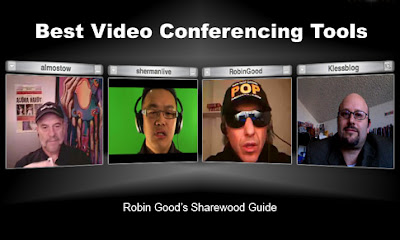
Robin Good has published another round up of videoconferencing tools available for PC and Mac users titled, Best Video Conferencing Tools That Anyone Can Use - Sharewood Guide - Robin Good's Latest News, and if you look closely at the image from the guide which I've included here you'll see I've been syndicated as part of banner graphic.

I've used many of these videoconferencing and webconferencing tools and I'm hearing about a few of them for the first time. As Robin says, "Video conferencing tools often integrate some complementary features beyond video, audio/VoIP and text chat, such as a file transfer facility or an audio/ video recording feature." He added that the quality of the tools vary and that it's mainly influence by the quality of your web cam and your internet connection.

If you're familiar video compression you know that motion degrades video quality and that a still image will look much clearer in comparison. The size of your bandwidth pipe affects how much data you can send and receive and some of the videoconferencing tools are optimized to work well at low data rates while others have expanded features available at higher data rates. One evolving feature available at higher data rates is HD video quality at 720p with H.264 encoding which you'll be hearing more about as broadband connections become the norm. While most of these videoconferencing solutions operate well on low bandwidth you may sometimes a fair amount of motion artifacts, tiling and freezing in the video. - Update 9/10/08

However, that's not covered in the Sharewood Guide and it focuses on the following key videoconferencing features:
  • Streaming feeds number (or number of participants)
  • Text-chat
  • File transfer
  • Session Recording
  • Web-based
Here's the list and you can read more about each tool in the Sharewood Guide:
  1. Oovoo
    Software client. Free up to 3 and subscription-based up to 6 with recording.
    http://www.oovoo.com/

  2. Adobe Connect Now
    Free after registration.
    http://www.acrobat.com/

  3. VSee
    Free for unlimited number of participants.
    http://vsee.com/

  4. SightSpeed
    Free for two people, or $9.95/month for 4 people and unlimited video storage.
    http://www.sightspeed.com/

  5. PalBee.com
    Free.
    http://www.palbee.com/

  6. MeBeam
    Free web-based with up to 16 participants, has had problems with nudity.
    http://www.mebeam.com/

  7. Vidivic
    Free with up to 9 particpants.
    http://www.vidivic.com/

  8. FlashMeeting
    Need a registered user invite.
    http://flashmeeting.open.ac.uk/

  9. MegaMeeting
    Up to 16 participants.
    http://www.megameeting.com/

  10. WengoMeeting
    Register and add up to 5 users. Free.
    http://www.wengomeeting.com/index.php

  11. EkkoTV
    Free and web-based, no downloads.
    http://www.ekko.tv/

  12. Vawkr
    Free and web-based, no downloads.
    http://vawkr.com/


Video Calling

  1. Skype
    Free, the ubiquitous peer-to-peer software client.
    http://www.skype.com

  2. Tokbox
    Free, web-based, can record video messages.
    http://www.tokbox.com/

  3. SnapYap
    Free, peer-to-peer calls, need a registered user.
    http://www.snapyap.com/

Best Video Conferencing And Video Calling Services - Comparison Table


go to the table!

* Values intended for paid versions only.


This content was originally published as Best Video Conferencing Tools That Anyone Can Use - Sharewood Guide - Robin Good's Latest News by Robin Good on September 8, 2008 for Master New Media.

Creative Commons License
This work is licensed under a Creative Commons License.

Friday, August 22, 2008

Nokia N95 Test: Comparing Qik and N95 Video Quality

It's been two weeks since I returned the Nokia 95 to Nokia/WOM World which had been on loan as a demo trial device. I had a month to test it out and out it through it's paces. Nokia/ WOM World offers trial devices to social media users interested in participating in their trial program. The N95 8GB North American version is like the regular N95 8GB with a 5MP Carl Zeiss lens camera with auto-focus, video recording and many other features. My mobile carrier is ATT so it was easy for me to drop in my SIM card and upgrade my current plan to unlimited data to test out the applications I was really interested in, which were live mobile streaming.

My overall impression is that the N95 is a great device for video and photos and applications like Qik, Flixwagon, Kyte and Livecastr, which were ones I tested. The install and set up for each application was easy. However, the browser was a little archaic and without a QWERTY keyboard made seemingly simple feats like typing a real challenge (and a pain.) While I tried all four of the live mobile streaming applications I have to say that Qik is my favorite and it's the focus this post on comparing the quality of the Qik to the N95 video recording.

For the test my friend Rich recorded two clips of me in a studio setting with professional lighting and proper acoustics. One video was streamed live to the Qik web site (which was later archived) and the other was recorded straight onto the N95 (and not streamed live.) Both videos were recorded at the highest settings available on the N95 and Qik (640x480, high quality, highest FPS (frames per second). What's unclear in this test is the encoding mode (1 or 2-pass VBR, CBR), keyframe placement, filter settings (contrast, brightness, gamma) and how they're encoded (as MPEG-4 Part 2 or H.263 or MPEG-4 Part 10 (AVC/H.264) and I admit this is not an apples to apples comparison since the two videos were compressed at different bit rates and audio frequencies.


3gp profile
Video codec: Apple MPEG4 Decompressor, 640 x 480, Millions
AMR Narrowband, Mono, 8.000 kHz
Frames per second: 14.88 FPS (average)
Data rate: 516.57 kbits/s


In the Studio from Larry Kless on Vimeo.

mp4 profile
Video codec: Apple MPEG4 Decompressor, 640 x 480, Millions
Audio: AAC, Mono, 48.000 kHz
Frames per second: 29.22 FPS (average)
Data rate: 2056.22 kbits/s

There's a noticeable difference in detail in the Qik .3gp and the N95 .mp4 videos. The 3gp has more compression rendering less detail compared to the mp4. Compression rates also affect the audio quality. You can also really hear the difference between the 8 kHz narrowband compression of the 3gp to the 48 kHz ACC compression of the mp4. I think the n95 microphone does do a good job picking up sound even though it faces away from your shooting subject and it is possible to insert an external microphone.

The real time playback (temporal quality) of both videos holds up and there's not much motion artifacting but there's visible blockiness, fuzzyiness and noise. While there's a fair amount of color accuracy with both, neither video could actually capture the detail in the herringbone pattern of my jacket which is actually not something you should wear for video. I also should have taken a tip from myself since I always tell clients with jackets to wear a solid color (no busy patterns), fix their shirt collars, pull on their coat tails and sit on them to smooth out the shoulder line. I probably should have applied some make up too to cut out some of the shine. I'll keep those tips in mind for next time. ;-)

Tuesday, July 29, 2008

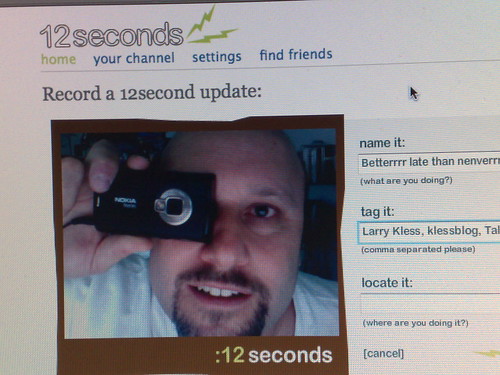
12seconds.tv Makes Its Fun Debut

I just got my invitation to join 12econds.tv prior to taking a few days off with the family in Aptos and Santa Cruz. 12seconds is a new video messaging service that's currently in private alpha and like Twitter (which limits your messages to 140 characters) 12seconds limits your video messages to 12 seconds each. TechCrunch calls it "the real video Twitter" and offered 500 invites. Cordiva also offered 500 invites courtesy of ReadWriteWeb and you can read more on their about page or on this Stage Two Consulting blog post.

It's also similar to Seesmic and Phreadz (the UK Seesmic competitor that launched with threaded conversations) in that you are using video to share your thoughts and status and follow friends within a social network. It just so happens that 12seconds is based in Santa Cruz where I'm currently enjoying a few days vacation with my family. Founded by David Beach and Sol Lipman as a side project they are a small company of nerds and funded by burritos. 12 seconds works with mobile phones too and the time limit is real as the 12 second timer counts you down for every message.

My 1st 12 seconds Message on 12seconds.tv
"12seconds is the best place online for video status updates. It's a super easy way to share what you're doing with your friends and family using short video clips. You can use your web cam or mobile phone. Show your friends where you are, share your thoughts, or tell them how you're doing. We are building a video status platform that will help you keep up to date with your friends 12 seconds at a time." - About 12seconds
To join the fun, send an email to: info@12seconds.tv

Friday, July 18, 2008

Live Mobile Broadcasting with Kyte, Qik and Flixwagon

It's the middle of the summer and the heat is on. The live mobile broadcasting solutions, Kyte, Qik and Flixwagon, got some press in the tech blogs with two stories the last two days.

Beet.TV Associate Producer Kelsey Blodget, posted a new story "Kyte Blows in a Different Direction Than Qik, Flixwagon" that includes an interview with Kyte CEO Daniel Graf, who says that Kyte is really not in competition with with Qik and Flixwagon and has broader focus.
" Kyte is focused on a different market, partnering with entertainment companies including the four major record labels (Universal, Sony, EMI and Warner), MTV Europe and KROQ. It also will support any type of video content, whether online, mobile, live or recorded, while Qik and Flixwagon are primarily concerned with the live cell phone streaming of individual users. Kyte also lets users embed branded, automatically updating players on their websites and allows fans watching a channel on different sites to chat." - Kelsey Blodget, Beet.TV

I've covered Kyte before on this blog and listed the related links below. In particular, there's another interview with Daniel Graf on how Kyte is different from Seesmic, Qik and Flixwagon.

In a related story on TechCrunch Jason Kincaid posted, "Mobile Livecasting Faces Off: Qik vs Kyte vs Flixwagon" that compares the quality of three main mobile streaming platforms. They recruited Sarah Austin of Pop17.com to be the on-camera test subject for the quality tests and recorded a similar clip using each solution. The tests were more subjective than technical and didn't seem to have a set benchmark. Ratings issued on the video, audio and the player and Kyte edged out Qik on video and audio quality only with Flixwagon coming in third. Check out Jason's review to see all the videos.


There were some great comments on the post which listed other live mobile broadcasting applications and some pointing out that the test didn't delve into the technical specifics like this one from Ben:
"Technical comment regarding the comparison, that I think is somewhat wrong(!!!): You could clearly see the video shot on the Flixwagon video shot is much closer to the subject than Qik and Kyte. The surrounding are mostly white and compress better hence video quality of the picture will be better in this framing with all services. Another point not mentioned, I do know that both Qik and Flixwagon have quality settings - and I believe Qik goes up to 640×480 - what were the setting in each broadcast? how “live” was the broadcast? ignoring this is simply rating the default selection of each provider…"

Another comment from N95 was:
"nice comparison, but too simple, i’m afraid. i’m missing a more real-live set of tests using 3G using an adequate “no-delay” / medium resolution setting, which is more likely to be the normal setting for live-streaming, when someone is out and about. also i’m missing the technical details for each test, like resolution, bandwith used, delay, framerate, etc."
Livecast (formerly known as ComView) was also considered but they couldn't get the video to embed so it wasn't included. It supports Windows Mobile 5/6 and Symbian S60 phones, incorporates GPS and does have syndication capabilities for blog, YouTube and Twitter. It sounds like it should be great but formmy experience it actually performed poorly most likely not be a contender.

Regarding players Jason concluded that:
"Preference in the embeddable players will largely come down to a matter of taste. Qik’s player has the best styling, but it lacks the embedded chat features that are found on Kyte (Qik has a chat button in the player, but it doesn’t seem to do anything). Again, FlixWagon falls short in this area - it’s overly simplistic player is neither stylish nor feature-rich."

There are a number of other services available but none of them have had the amount of exposure and user adoption this past year as Kyte, Qik and Flixwagon. I'm currently testing all of these live mobile broadcasting platforms using a trial Nokia N95 compliments of WOM World/Nokia and so far Qik is my favorite. I plan to spend more time with mobile Kyte, Qik and Flixwagon during the next few weeks and publish my finding here on this blog.

Related posts from this blog on Live Mobile Streaming:
A few from other blogs:

Tuesday, July 15, 2008

Mashable: How to Live Stream Your Life: 20+ Tools and Resources

Mashable writer Sean P. Aune published a new list of video lifestreaming applications in a post titled, How to Live Stream Your Life: 20+ Tools and Resources. He identifies the 20+ popular video platforms used for lifestreaming and live broadcasting into three categories: mobile single platform, webcam, multi-platform streaming and others. I've used a number of these tools and services and have found that many of them have similar features and options for syndication.

Sean writes, "Video lifestreaming has become more and more popular with the increasing availability of mobile video recording technology and the decreasing price of webcams. So why not try it out?"

The following is written by
Sean P. Aune for Mashable and originally published on July 15, 2008 as: How to Live Stream Your Life: 20+ Tools and Resources

Mobile single platform
  • CometNow.com - Allows you to stream using your Windows Mobile device to other cell phones or to computers by going to your streaming page. Works with Windows Mobile devices.
  • Flixwagon.com - Allows you to stream video live from your phone, save it for later and even alert Twitter to who you are recording. Works with Symbian based phones.
  • LiveCastr.com - Works with any 3G enabled phone and requires no download to work. Stream can be embedded into social network pages and all videos are automatically archived.
  • Vox.com - The Vox blogging community also allows you to upload video directly from your N Series Nokia phone to your account. The service is Symbian based.
Multi-streaming platform
  • Justin.tv - Made famous for the fact that the founder, Justin, streamed his life 24/7 when the site started up, and was followed by iJustine spending six months streaming her life. The service can be used with webcams and mobile devices.
  • Kyte.com -Kyte can be used from webcams or mobile devices, and allows you to brand your channel as well as monetize it.
  • Livecast.com - Formerly Comvu, Livecast lets you broadcast your life from a wide-range of mobile phones from carriers all over the world, as well as using your own computer.
  • Mogulus.com - A video streaming service that focuses on desktop services, but does have a complicated looking workaround for mobile streaming.
  • Qik.com - Qik is available on multiple mobile platforms, including the iPhone, with more planned to come. Stream live from your phone to their site, allowing you to broadcast from anywhere.
  • Shozu.com - Shozu enables several models of mobile phones to upload and tag photos you take to over 30 social networks including Facebook, YouTube, Blogger and more with just a couple of clicks.
Webcam
  • BlogTV.com - Allows you to broadcast live or pre-recorded shows, embed them on your blog, download favorite shows, and more.
  • Live.Yahoo.com - Yahoo’s live streaming service that sends messages to Twitter, embeds selected videos on MySpace, and offers an API for those who need it.
  • NowLive.com - Features personal channels as well as a heavy focus on scheduled shows and live coverage from events like movie premiers.
  • Seero.com - Mixes video streaming with geo-tagging to show you where the feed is coming from as well as factoids from that location.
  • Seesmic.com - Referred to as “the Twitter of video”, Seesmic is a micro blogging video service for use with webcams.
  • UStream.tv - Popular with people wishing to do personal webcam shows as it also provides an embeddable chat room you can put into your own site.
  • Yaika.com - A European streaming service that makes your streaming page look like a blog
Others
  • EarthCam.com - More of a repository of old school webcams. People also use the service for shows.
  • HelloWorld.com - HelloWorld charges for their streaming service, but offers a lot of other services like private video IMs and more.
  • Icecast.org - Allows you to set up your own live streaming system, but is for more advanced users.
  • RantTV - Scheduled live streaming shows with a heavy focus on music.
  • ShoutCast.com - Allows you to set up a video stream just like you do with audio over the ShoutCast system.
  • Stickam.com - Focuses a bit more on a scheduled show format than other services, but

Sunday, July 6, 2008

How Do You ooVoo? My Video Chat with ooVoo CEO Philippe Schwartz

It's not everyday that I get the opportunity to have an in-depth conversation with the CEO of an online video platform, but I did just that the other day. I spoke with Philippe Schwartz, Chief Executive Officer of ooVoo, who hosted the first of a series of video chat sessions featuring ooVoo employees called "How Do You ooVoo?" It's a chance for the ooVoo community to talk with the people behind the scenes to share how they feel about the product and how they use it. I've already signed up for several sessions and you can join as well by going to the How Do You ooVoo? link.

ooVoo is a free multi-party videoconferencing application that's very similar in form and function to Skype. The main difference between the two is that ooVoo allows you to have up to a 6-way video chat with a paid account and 3-person video chats for free. ooVoo recently moved to a paid plan following their promotional period.

Several months ago ooVoo hosted a series of My ooVoo Day With... video chat sessions which gave fans an opportunity to speak directly with some of their favorites bloggers that included Chris Brogan, Erin Kotecki Vest, Marshall Kirkpatrick, John Wall, Robin Good, iJustine and many more. It was a promotion event headed up by the people at Crayon to get the word out and also raise money for the Frozen Pea Fund in the name of 22 charities. I participated in 3 of the 161 video chat sessions that took place over 12 days. There's a great commemorative video of the event here.
[snapshot1.jpg]
In my video conversation with Philippe Schwartz, he said that he was moved by the"My ooVoo Day With..." event and had waited a few years to create a conversation with the ooVoo community. Also participating in the video call was Robert Muffoletto, an educator and coordinator of New Media & Global Education at Appalachian State University who joined from Holland. Roberto coordinates an international online masters program and shared some interesting stories on how his students are using ooVoo. We spoke about a range of topics from ooVoo's product roadmap, their vision, community feedback and upcoming ooVoo events. Philippe recorded the session which lasted over an hour and posted it here.

Philippe said the PC version of ooVoo has about 9 months of development on the Mac OS version and that's why it has more features. But the new Mac OS version will be available July 28th and will incorporate video recording and telephony. He also said ooVoo was developed as a consumer product and not a business product and that they have focused on superior video and audio quality for multi-party calls. The quality of the video and audio is one of best I've experienced on the variety of two-way video chat solutions that I've used. Philippe said that's achieved by their proprietary algorithm. He added that new ooVoo offerings will feature moderated calls, scheduled events through an ooVoo portal he calls "ooVoo in a box", notifications through IM, more integration with social applications like Facebook and MySpace and the release of API's for web and widget development.

Regarding more "My ooVoo Day With..." events, Philippe said they are about to launch a new event at the end of this month focusing on the elections called, My ooVoo Day With, Political Edition and more of the regular "My ooVoo Day With..." events will follow later in the year.

Why not give it a try?

Monday, June 23, 2008

New Blog Feature: Minime Widget Makes it More Social

A few days ago the MeBeam blog posted code on their web site that they call Minime which makes it possible for you to embed a portable Mebeam widget on your blog that allows you to have a live 4-party video chat. I've installed it here on my blog below my bio and if you'd like to add it to your blog you can get the code here.

As the MeBeam blog says,
"Please keep in mind, this is a pre-alpha release and may not work all the time. MiniMe can handle 4 people in your room, but will generate an unlimited number of sub-rooms automatically."
This new feature may or may not stay on my blog and right now I'm testing it's functionality and usability. I personally stay away from main Mebeam website as it has too many weirdo guys showing off their private parts on camera. Please let me know if you see any lewd or lascivious behavior. I don't condone it and I'll remove the Minime widget immediately.

In the meantime though, if you happen to be visiting and have a webcam stop in and chat with me or others who might be online.

Update 2/19/09: Minime removed from blog sidebar due to its instability and installed directly in this post below.